Rendered Invoice Example
When an invoice is submitted through the Heirs E-Invoicing Middleware and successfully validated by FIRS, the platform generates a standardised, FIRS-compliant tax invoice document. Below is a sample of what that rendered invoice looks like, followed by an explanation of each component.
Sample FIRS-Compliant Tax Invoice
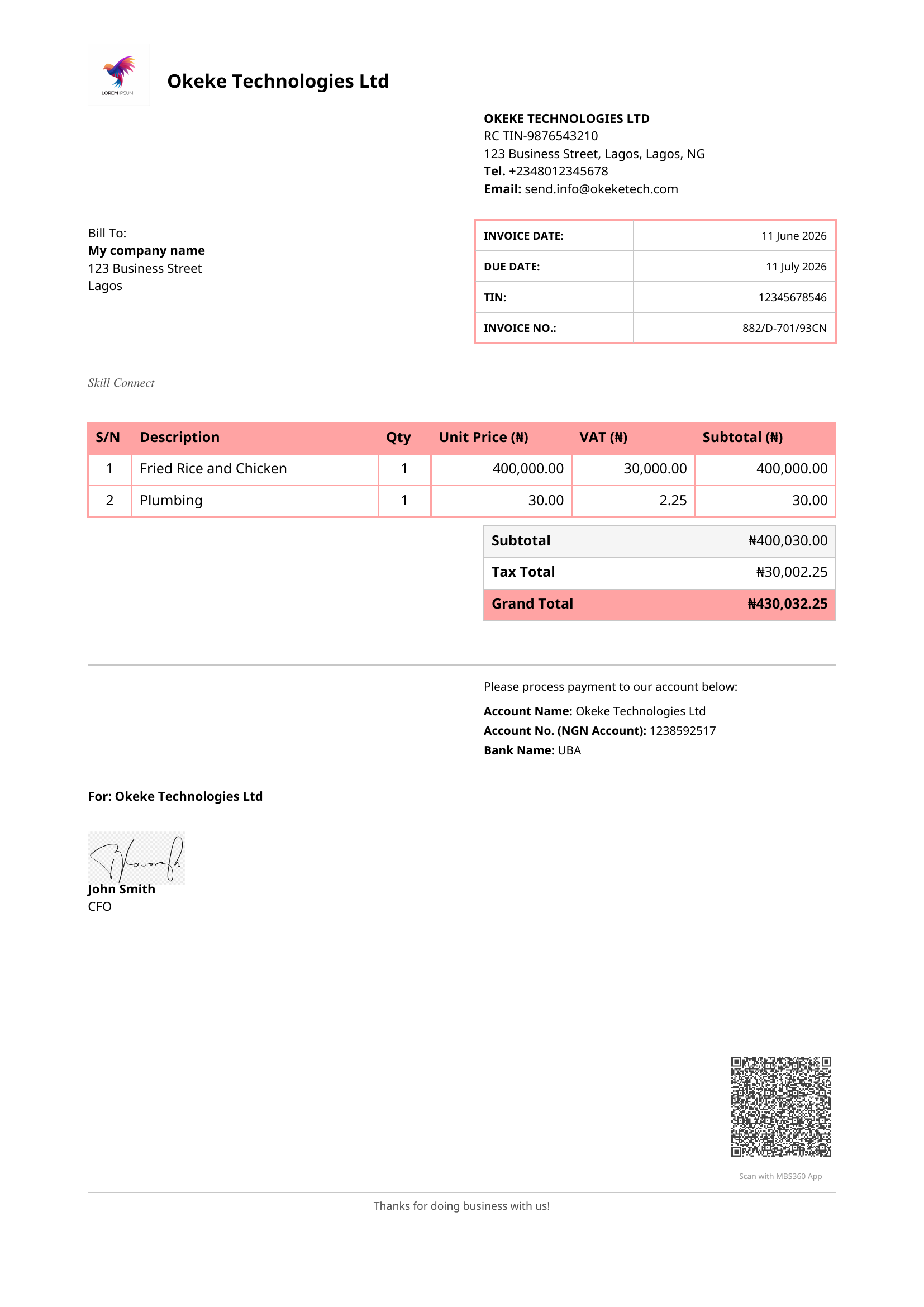
Invoice Components
1. Supplier Header
The top-left of the invoice displays the supplier's logo alongside their registered business name. This section identifies the issuing entity and is pulled from the tenant's business profile configured during onboarding.
2. Supplier Contact Details
The top-right block contains the supplier's full legal and contact information:
| Field | Description |
|---|---|
| Business Name | Registered legal name as filed with the CAC |
| RC / TIN | Company Registration Number and Tax Identification Number |
| Address | Full registered business address |
| Tel | Primary contact telephone number |
| Official business email address |
This information is sourced directly from the tenant's business settings and must match FIRS records exactly.
3. Bill To (Buyer Details)
The left-hand section below the header identifies the customer receiving the invoice — their company name and address. This is populated from the invoice payload submitted by the ERP system.
4. Invoice Metadata
A structured table on the right captures the key invoice identifiers required by FIRS:
| Field | Description |
|---|---|
| Invoice Date | Date the invoice was issued |
| Due Date | Payment due date |
| TIN | Buyer's Tax Identification Number |
| Invoice No. | Unique invoice reference in the format assigned by the middleware (e.g. 882/G-701/93CN) |
The Invoice Number is system-generated and immutable once the invoice is validated.
5. Platform Identifier
A label (e.g. SIIT Connect) identifies the integration platform or ERP connector through which the invoice was submitted. This provides an audit trail linking the invoice back to the originating system.
6. Line Items Table
The core of the invoice — a tabular breakdown of all goods or services billed:
| Column | Description |
|---|---|
| S/N | Sequential line item number |
| Description | Name or description of the product or service |
| Qty | Quantity supplied |
| Unit Price (₦) | Price per unit before tax |
| VAT (₦) | Value Added Tax calculated at the applicable rate (7.5% standard) |
| Subtotal (₦) | Extended line total (Qty × Unit Price) |
Each line item is transformed from the ERP's native format into FIRS UBL 2.1 schema during processing.
7. Totals Summary
Below the line items, three summary rows provide the financial totals:
| Row | Description |
|---|---|
| Subtotal | Sum of all line item subtotals before tax |
| Tax Total | Total VAT across all line items |
| Grand Total | Final payable amount (Subtotal + Tax Total), highlighted in red |
The Grand Total is the authoritative amount recorded with FIRS.
8. Payment Instructions
A section below the totals provides the supplier's banking details for payment:
- Account Name — Registered name on the bank account
- Account No. — Nigerian bank account number
- Bank Name — Name of the receiving bank
This section is optional and populated from the tenant's payment settings.
9. Authorised Signatory
The bottom-left contains the authorisation block — the company's signing statement ("For: [Business Name]"), a handwritten or digital signature, and the signatory's name and title (e.g. John Smith, CFO). This authenticates the invoice on behalf of the issuing organisation.
10. QR Code
The bottom-right corner carries a FIRS-issued QR code generated at the point of transmission. Scanning the QR code verifies the invoice's authenticity and compliance status directly against the FIRS MBS database. It encodes the Invoice Reference Number (IRN) and transmission timestamp.
11. Footer
A courteous closing message (e.g. "Thanks for doing business with us!") and a note to scan the QR code using the FIRS Scan App. This section confirms the invoice is complete and ready for the buyer's records.